Tag: cpp

  • Overloading by return value in C++

    Here we have a method that allows us to determine return parameter type using templates and operator overloading in C++. This is something that I needed for a project that I am working on where a method call would give me the expected type based on the return type.

    Usage

    There is two way of using this. First one is by calling the para method and second one is by invoking the conversion method directly parameter.
    Personally, I prefer the first one as this one allows me to use it with auto keyword.

    
    std::string p0   = param<std::string>(arguments, 0);
    auto        p0_a = param<std::string>(arguments, 0);
    
    int         p1   = param<int>(arguments, 1);
    auto        p1_a = param<int>(arguments, 1);
    
    // Invoking parameter conversion directly
    std::string p0_p = parameter(arguments, 0); 
    int         p1_p = parameter(arguments, 1);
    

    Implemenation

    struct parameter
    {
    	parameter(const CefV8ValueList & arguments, int index) 
    		:_arg (arguments.at(index)) 
    	{
    	};
    
    	operator std::string() { return _arg->GetStringValue().ToString(); }
    	operator int() { return _arg->GetIntValue();}
    	operator bool() { return _arg->GetBoolValue(); }
    	operator double() { return _arg->GetDoubleValue();}
    
    	CefRefPtr _arg;
    };
    
    template
    T param(const CefV8ValueList & arguments, int index)
    {
    	return parameter(arguments, index);
    }
    

    Reference :
    http://en.cppreference.com/w/cpp/language/cast_operator

  • Creating Javascript accessible object from C++ / CEF

    Example with Chromium Embedded Framework (CEF) on how to create an object in C++ and make it accessible via Javascript.

    console.inof(api)
    Object {ready: true, version: "psql.0.0.1", info: Object, getVersion: function}
    
    void ExtractEngineApp::OnContextCreated(
    	CefRefPtr browser, 
    	CefRefPtr frame, 
    	CefRefPtr context)
    {
    
    	auto info = CefV8Value::CreateObject(NULL, NULL);
    	info->SetValue("major", CefV8Value::CreateString("0"), V8_PROPERTY_ATTRIBUTE_READONLY);
    	info->SetValue("minor", CefV8Value::CreateString("1"), V8_PROPERTY_ATTRIBUTE_READONLY);
    	
    	auto global = context->GetGlobal();
    	auto api = CefV8Value::CreateObject(NULL, NULL);
    
    	global->SetValue("api", api, V8_PROPERTY_ATTRIBUTE_NONE);
    
    	auto fun = CefV8Value::CreateFunction("getVersion", new engine:: PhantomExtensionHandler(this));
    	api->SetValue("getVersion", fun, V8_PROPERTY_ATTRIBUTE_NONE);
    	
    	// Readonly properties
    	api->SetValue("ready", CefV8Value::CreateBool(true), V8_PROPERTY_ATTRIBUTE_READONLY);
    	api->SetValue("version", CefV8Value::CreateString("psql.0.0.1"), V8_PROPERTY_ATTRIBUTE_READONLY);
    
    	// Readonly Object access
    	api->SetValue("info", info, V8_PROPERTY_ATTRIBUTE_READONLY);
    }
    
    
    class PhantomExtensionHandler : public CefV8Handler
    	{
    	public:
    		explicit PhantomExtensionHandler(CefRefPtr client_app)
    			: client_app(client_app)
    			, messageId(0)
    		{
    
    		}
    
    		virtual bool Execute(const CefString& name,
    			CefRefPtr object,
    			const CefV8ValueList& arguments,
    			CefRefPtr& retval,
    			CefString& exception)
    		{
    			if (name == "getVersion")
    			{
    				retval = CefV8Value::CreateString("Version(SemVer) # 0.0.1");
    			}
    
    			return true;
    		}
    
    	private:
    		CefRefPtr client_app;
    		int32 messageId;
    
    		IMPLEMENT_REFCOUNTING(PhantomExtensionHandler);
    	};
    
  • Calculating partial Hausdorff Distance

    
    struct Point
    {
    	Point(int_t _x, int_t _y) : x(_x), y (_y)
    	{
    
    	}
    
    	int_t x;
    	int_t y;
    };
    
    
    typedef std::list points_t;
    
    double euclideanDistance(const Point& lhs,const Point& rhs)
    {
    	 double p1 = std::pow((float)(rhs.x - lhs.x), 2);
    	 double p2 =  std::pow((float)(rhs.y - lhs.y), 2);
    	 double vd =  std::sqrt(p1 + p2);
    
    	 return vd;
    }
    
    
    double hausdorffPHD(points_t seta, points_t setb)
    {
        double maxDistance = 0;
    
        points_t::iterator afront = seta.begin();
        points_t::iterator aback  = seta.end();
    
        std::vector ranking;
    
        for(int_t i=0; afront != aback ; ++afront, ++i)
        {
        	Point* a = *afront;
            double minDistance = std::numeric_limits::max();
    
            points_t::iterator bfront = setb.begin();
            points_t::iterator bback  = setb.end();
    
        	for(; bfront != bback ; ++bfront)
    	    {
        		Point* b = *bfront;
        		double ed = euclideanDistance(*a, *b);
    
                if (ed < minDistance)
                    minDistance = ed;
    	    }
    
        	ranking.push_back(minDistance);
        }
    
        std::sort(ranking.begin(), ranking.end());
    
        double fraction = .7;
        int k = (int) (seta.size() * fraction);
        return ranking[k];
    }
    
    
    double hausdorff(points_t seta, points_t setb)
    {
        double habPHD = hausdorffPHD( seta, setb);
        double hbaPHD = hausdorffPHD( setb, seta);
        double distancePHD = std::max(habPHD, hbaPHD);
        printf("hd = %0.4f\t %0.4f\t %0.4f\t \n", distancePHD, habPHD, hbaPHD);
        return distancePHD;
    }
    
    
    int_t main(int_t argc, char_t** args)
    {
    
    	points_t seta;
    	points_t setb;
    
    	seta.push_back(new Point(1,2));
    	seta.push_back(new Point(2, 4));
    
    	setb.push_back(new Point(2, 4));
    	setb.push_back(new Point(3, 4));
    
    	double val = hausdorff(seta, setb);
    }
    
  • Leptonica barcode generation

    Leptonica provides us with easy way to read barcodes but it does not offer a way to create them(as far as I know). Here is a leptonica function that will allow us to generate CODABAR barcode, in the feature I am planning on adding more type and more options but for now this was all I needed.

    Sample Usage

    l_int32 res = 300;
    l_int32 bar_width = .02 * res;
    l_int32 bar_height = .35 * res;
    
    // Barcode is bitonal
    PIX* barcode= pixCreateBarcodeCodebar("C3853110009C", bar_width, bar_height, 10, 10, 2, 2);
    if (barcode == NULL)
    {
    	printf("\n******** ERROR ***********");
    	return;
    }
    pixWritePng("c:/temp/barcode.png", barcode, 0);
    

    Implementation

    /**
     * Barcode Generator
     * @author : greg
     */
    #ifndef CREATEBARCODE_H_
    #define CREATEBARCODE_H_
    
    #include 
    
    #if !defined(LEPTONICA_ALLHEADERS_H)
    #   include 
    #endif
    
    #if !defined(LEPTONICA_READBARCODE_H)
    #	include 
    #endif
    
    /* ----------------------------------------------------------------- *
     * Codabar symbology                         *
     * Data  B  S  B  S  B  S  B   Value
     * 0     0  0  0  0  0  1  1     0
     * 1     0  0  0  0  1  1  0     1
     * 2     0  0  0  1  0  0  1     2
     * @ref http://www.barcodesymbols.com/codabar.htm
     * @ref leptonica/readbarcode.h
     * ----------------------------------------------------------------- */
    static const char *CodabarCodes[] =
    { "1111122", "1111221", "1112112", "2211111", "1121121", /* 0: 0 - 4      */
    "2111121", "1211112", "1211211", "1221111", "2112111", /* 5: 5 - 9      */
    "1112211", "1122111", "2111212", "2121112", "2121211", /* 10: -,$,:,/,. */
    "1121212", "1122121", "1212112", "1112122", "1112221" /* 15: +,A,B,C,D */
    };
    
    int mapCodebarToIndex(const char c)
    {
    	switch (toupper(c))
    	{
    	case '0':
    	case '1':
    	case '2':
    	case '3':
    	case '4':
    	case '5':
    	case '6':
    	case '7':
    	case '8':
    	case '9':
    		return atoi(&c);
    	case '-':
    		return 10;
    	case '$':
    		return 11;
    	case ':':
    		return 12;
    	case '/':
    		return 13;
    	case '.':
    		return 14;
    	case '+':
    		return 15;
    	case 'A':
    		return 16;
    	case 'B':
    		return 17;
    	case 'C':
    	case '*':
    		return 18;
    	case 'E':
    	case 'D':
    		return 19;
    
    	}
    	return 0;
    }
    
    /**
     * Crate 8 bpp Codebar barcode
     */
    PIX* pixCreateBarcodeCodebar(const char* code, l_int32 bar_width, l_int32 bar_height, l_int32 margin_left,
    		l_int32 margin_right, l_int32 margin_top, l_int32 margin_bottom)
    {
    	PROCNAME("pixCreateBarcodeCodebar");
    
    	printf("\n Rendering : %s", code);
    	//The width ratio between narrow and wide can be chosen between 1:2.25 and 1:3
    	l_float32 ratio = 2;
    	l_int32 width_wide = bar_width * ratio;
    	l_int32 narrow_space = bar_width;
    	// Calculate size
    	l_int32 size = 0;
    	for (int i = 0; code[i] != '\0'; ++i, ++size)
    	{
    		// NOOP
    	}
    	// allocate big enough image
    	PIX* pix = pixCreate(size * width_wide * 7, bar_height, 1);
    	pixSetResolution(pix, 300, 300);
    
    	l_int32 xpos = margin_left;
    	for (int i = 0; i < size; ++i)
    	{
    		const char* encoding = CodabarCodes[mapCodebarToIndex(code[i])];
    		for (l_uint16 j = 0; j < 7; j++)
    		{
    			l_int32 renderwidth = bar_width;
    			if (encoding[j] == '2')
    			{
    				renderwidth = width_wide;
    			}
    			if ((j % 2 == 0))
    			{
    				for (l_int32 k = 0; k < renderwidth; ++k)
    				{
    //					pixRenderLineArb(pix, xpos+k, 0, xpos+k, height, 1, 0, 0, 0);
    					pixRenderLine(pix, xpos + k, margin_top, xpos + k, bar_height - margin_bottom, 1, L_SET_PIXELS);
    				}
    			}
    			xpos += renderwidth;
    		}
    
    		// Each character is separated by narrow space
    		if (i < size - 1)
    			xpos += narrow_space;
    	}
    
    	// Clip
    	BOX* bounds = boxCreate(0, 0, xpos + margin_right, bar_height);
    	pix = pixClipRectangle(pix, bounds, NULL);
    	boxDestroy(&bounds);
    	return pix;
    }
    
    #endif /* CREATEBARCODE_H_ */


    I think I will make this my first GIT project and share it with all, trying to move away from google code.

  • Population Count using popcnt instruction (counting number of on bits)

    Using popcnt instruction found on newer processors to get population count which is number of set bits.

    Reference : SSE4

    Here are couple example inputs with expected output.

     0xA =  1010 -- > 2
     0x3F2 =  1111110010 -- > 7	
    
    #include 
    #include 
    
    using namespace std;
    
    int main() {
    	// 0xA =  1010 -- > 2
    	// 0x3F2 =  1111110010 -- > 7
    	
    	unsigned long code = 0x3F2UL;
    	int bitcount = 0;
    
    	__asm__( "movl %1, %%eax; "  //code into eax
    			"popcnt  %%eax,  %%eax;"//  call popcnt instruction
    			"movl %%eax, %0;"// ebx into bitcount
    			:"=r"(bitcount)// output
    			:"r"(code)// input
    			:"%eax","%ebx","%ecx","%edx"// clobbered register
    	);
    
    	printf("%d", bitcount);
    	return 0;
    }
    

    Update
    To answer Phils question why we have "%eax","%ebx","%ecx","%edx" as our clobbered register list, this is my understanding and it could be completely wrong.

    Our instruction movl %%eax, %0; used GCC syntax for accessing c++ variable bitcount. So ‘%0’ refers to bitcount which will be copied into ebx register, that is why I have ebx in the list, as for the ecxand edx they have been added purely because they are general purpose registers and I did not want to override some previously stored value and my limited understanding on how inline assembly works.

  • Leptonica Tutorial – Cropping

    Common use is to crop to certain area of an image, this can be quite easily accomplished with following code.

    BOX* box = boxCreate(x, y, w, h);
    PIX* dpix= pixClipRectangle(spix, box, NULL);
    
  • Using ‘cpuid’ instructions to get cache line size

    This is program demonstrates how to use ‘cpuid’ assembly instruction on x86 to retrieve cache line size. This is done in c++ and it uses the inline assembly to execute the instructions, compiled with gcc on win32.

    Really we are only interested in Cache line information which can be found using 0x80000006 code and its lower 8 bits returned from ECX register.

    #include 
    #include 
    #include 
    
    int MASK_LSB_8 = 0xFF;
    
    void int2bin(int val) {
    	char buffer[33];
    	itoa(val, buffer, 2);
    	printf("binary: %s\n", buffer);
    }
    
    // CPUID instruction takes no parameters as CPUID implicitly uses the EAX register.
    // The EAX register should be loaded with a value specifying what information to return
    void cpuinfo(int code, int *eax, int *ebx, int *ecx, int *edx) {
    	__asm__ volatile(
    			"cpuid;" //  call cpuid instruction
    			:"=a"(*eax),"=b"(*ebx),"=c"(*ecx), "=d"(*edx)// output equal to "movl  %%eax %1"
    			:"a"(code)// input equal to "movl %1, %%eax"
    			//:"%eax","%ebx","%ecx","%edx"// clobbered register
    	);
    }
    
    int main() {
    	int eax = 0, ebx = 0, ecx = 0, edx = 0;
    	//CPUID(0): Basic information
    	cpuinfo(0x0, &eax, &ebx, &ecx, &edx);
    
    	// check vendor [GenuineIntel, GenuntelineI] = ebx+ecx+edx
    	char vendor[13] = { 0 };
    	int identity_reg[3] = { ebx, ecx, edx };
    	for (unsigned int i = 0; i < 3; i++) {
    		for (unsigned int j = 0; j < 4; j++) {
    			vendor[i * 4 + j] = identity_reg[i] >> (j * 8) & MASK_LSB_8;
    		}
    	}
    	printf("\nVendor name = %s\n", vendor);
    
    	//CPUID(0x80000000): Extended CPU information
    	cpuinfo(0x80000000, &eax, &ebx, &ecx, &edx);
    	int intelExtended = eax & MASK_LSB_8;
    	printf("\nMax feature id = %d\n", intelExtended);
    	if (intelExtended < 6) {
    		printf("\nCache Extended Feature not supported");
    		return 0;
    	}
    	// CPUID(0x800000006): Cache line information
    	cpuinfo(0x80000006, &eax, &ebx, &ecx, &edx);
    	// We are only interested in lower 8 bits
    	printf("\nL2 Cache Size = %d\n", (ecx & MASK_LSB_8));
    }
    

    Here is the output from my machine.

    Vendor name = GenuntelineI
    Max feature id = 8
    L2 Cache Size = 64
    

    The following result can be verified by using cpu-z program.

      	L1 Data cache	4 x 32 KBytes, 8-way set associative, 64-byte line size
        	L1 Instruction cache	4 x 32 KBytes, 8-way set associative, 64-byte line size
        	L2 cache	4 x 256 KBytes, 8-way set associative, 64-byte line size
        	L3 cache	6 MBytes, 12-way set associative, 64-byte line size
    

    References

  • Leptonica Tutorial – Environment setup

    Leptonica Development with Eclipse

    This is the first one of few tutorials that I am writring on using Leptonica image processing library

    Before we start let’s give credit where the credit is due, and this is goes out to Jay W.(need link) on which this instructions are largely based on.

    Environment

    • Eclipse
    • MinGW
    • Leptonica

    I assume that you have installed and configured Eclipse CDT (http://www.eclipse.org/cdt/) plugging for C/C++ development, as well as MinGW and can run simple c++ hello world using make file.

    Setup

    1. Lets start by downloading latest leptonica library from Leptonica download site
    and extract the library into your lib directory I use E:/source/c-libraries/leptonica-1.68

    2. This is probably the most complicated part of the setup, configuring the Eclipse environment and compiling Leptonica hello world project.

    1. Lets start by ‘Creating new C++ Make Project’ and naming it ‘HelloWorldLeptonica’ in Eclipse, before continuing lets make sure we can compile and run the project.
    2. Now we will edit Properties for our newly created project, navigate to Properties->C/C++ Build -> Environment
    and add new property LEPT_HOME

    LEPT_HOME E:/source/c-libraries/leptonica-1.67
    

    Include/Library Configuration

    Navigate to Properties->C/C++ General -> Paths and Symbols and select Include Tab -> GNU-C++
    and add new Include directory ‘E:/source/c-libraries/leptonica-1.67/include’, this will allow us to browse includes from within Eclipse.
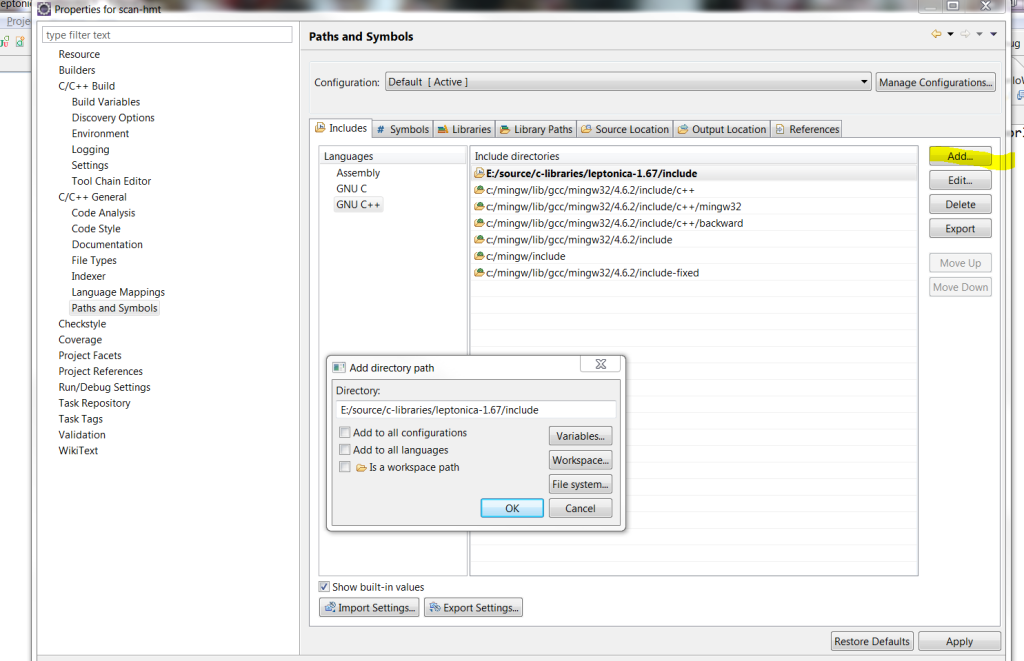
    Now lets copy leptonlib.dll from ‘E:/source/c-libraries/leptonica-1.67/lib’ into our project directory.
    this way we can run the project directly from Eclipse.

    Makefile Configuration

    I will highlight main sections that need to be configured, this is where we use our previously defined variable ‘LEPT_HOME’ come into play.

    • Include Files – INCS
    • Libraries – LIBS
    • Compiler Flags – CFLAGS

    We need to make sure to include header files and leptonica library.

    INCS		=	-I$(LEPT_HOME)/include		
    LIBS		=	-L$(LEPT_HOME)/lib		\
    			-lleptonlib			
    

    Capital flag -L indicates to includes $(LEPT_HOME)/lib directory in the search path, while lowercase -l indicates what library to load, if we wanted to include debug version we would use -lleptonlibd

    Here is a make file used by the demo project

    
    CFLAGS =	-O2 -g -Wall -fmessage-length=0
    CPP         =   g++
    OUTPUT_DIR	=	.
    OBJS		=	HelloWorldLeptonica.o
    INCS		=	-I$(LEPT_HOME)/include		
    LIBS		=	-L$(LEPT_HOME)/lib		\
    			-lleptonlib		
    PROJECT =	HelloWorldLeptonica.exe
    OUTPUT		=	$(PROJECT)
    
    all: $(PROJECT)
     
    $(PROJECT):	$(OBJS)
    	@echo Linking $(OUTPUT)
    	@$(CPP) $(LFLAGS) -o $(OUTPUT_DIR)/$(OUTPUT) $(OBJS) $(LIBS)
    	@echo Completed building $(OUTPUT)
     
    clean:
    	@echo Cleaning $(PROJECT)
    	@rm -rf $(OBJS) $(OUTPUT_DIR)/$(PROJECT) $(OUTPUT_DIR)/$(PROJECT).so $(PROJECT).so $(PROJECT) $(PROJECT).exe *.d
     
    -include $(OBJS:.o=.d)
     
    %.o:	%.cpp
    	@echo Compiling $<
    	@$(CPP) $(CFLAGS) -c $(INCS) -o $*.o $*.cpp
    	@$(CPP) -MM $(CFLAGS) $(INCS) $*.cpp > $*.d
     
    %.o:	%.c
    	@echo Compiling $<
    	@$(CC) $(CFLAGS) -c $(INCS) -o $@ $<
    	@$(CC) -MM $(CFLAGS) $(INCS) $*.c > $*.d


    Example

    As always we want to start with something simple so here is it, we get current directory and read in file a ‘test.png’ file, if all went well
    we display image dimensions.

    /**
     * Leptonica Hello World
     */
    #include 
    #include 
    #include 
    
    #include 
    #include 
    #include 
    
    #if !defined(LEPTONICA_ALLHEADERS_H)
    #   include 
    #endif
    
    int main(void) {
    	printf("\nTesting Leptonica Setup \n");
    
    	// Read test.png from current working directory
    	char* filename = NULL;
    	filename = getcwd(filename, MAXPATHLEN);
    	strcat(filename, "\\test.png");
    
    	PIX* pix = pixRead(filename);
    	if (!pix) {
    		printf("Error opening file");
    		return 1;
    	}
    	printf("Image width : %d", pix->w);
    	pixDestroy(&pix);
    	return 0;
    }
    

    If we want to build the project from outside of Eclipse you will have to define the the make file environmental variable in make file directly

     LEPT_HOME=E:/source/c-libraries/leptonica-1.67
    

    g++ and Eclipse debugging hint

    In am not an expert in c++ in any way so this can be totally wrong, but in order to get the debugger to work in eclipse
    the Compiler Flags (CFLAGS) need to be using -g -O0 instead of the default one -O2 -g.
    If we don’t do this then Eclipse complains that it can’t find the source when it hits a breakpoint.

    Download HelloWorldLeptonica Eclipse Project from here HelloWorldLeptonica

    At this point you should be ready to compile and run/debug leptonica project from within Eclipse IDE.

    As always comments and corrections are always welcome.

  • Quicksort implementation using Linked List

    About QuickSort

    Wikipedia QuickSort definition.

    General idea revolves around partitioning a list where values less than pivot go into left list while greater than go into right list.
    Pivot here is the first item of the passed in list. We apply this recursively to the sublists them merge left+pivot+right.

    CPP Code

    First of all not a cpp developer so if you can improve this them post a comment with suggestions.

    
    template 
    Node * List::quick_sort_recursive(Node* list)
    {
    	//Base case : list  is NULL
    	if(list ==  NULL){
    		return NULL;
    	}
    
    	//We choose first entry in the list as the pivot node
    	Node * pivotNode = new Node();
    	pivotNode->entry=list->entry;
    	Record pivot = pivotNode->entry;
    
    	Node *tmp=list->next;
    	Node *leftHead=NULL;
    	Node *rightHead=NULL;
    
    	Node *leftTail=NULL;
    	Node *rightTail=NULL;
    
    	//Partition the list into left/right sublists
    	while(tmp != NULL){
    		Node *entryNode=new Node();
    		entryNode->entry = tmp->entry;
    		entryNode->next = NULL;
    		if(tmp->entry < pivot){
    			if(leftTail == NULL){
    				leftTail = entryNode;
    				leftHead=entryNode;
    			}else{
    				leftTail->next=entryNode;
    				leftTail=leftTail->next;
    			}
    		}
    		else{
    			if(rightTail == NULL){
    				rightTail = entryNode;
    				rightHead=entryNode;
    			}else{
    				rightTail->next=entryNode;
    				rightTail=rightTail->next;
    			}
    		}
    		tmp = tmp->next;
    	}
    
    	//Recursively subdivide the left / right list
    	leftHead  = quick_sort_recursive(leftHead);
    	rightHead = quick_sort_recursive(rightHead);
    
    	//Combine left+pivot+right
    	Node * mergedHead=NULL;
    	Node * mergedTail=NULL;
    
    	Node *tmpNode=leftHead;
    	while(tmpNode){
    		Node *new_node=new Node();
    		new_node->entry=tmpNode->entry;
    		if(mergedTail == NULL){
    			mergedTail = new_node;
    			mergedHead= new_node;
    		}else{
    			mergedTail->next= new_node;
    			mergedTail=mergedTail->next;
    		}
    		tmpNode=tmpNode->next;
    	}
    	//Pivot point
    	if(mergedTail == NULL){
    		mergedTail = pivotNode;
    		mergedHead = pivotNode;
    	}else{
    		mergedTail->next=pivotNode;
    		mergedTail=mergedTail->next;
    	}
    	//Right sublist
    	tmpNode=rightHead;
    	while(tmpNode){
    		Node *new_node=new Node();
    		new_node->entry=tmpNode->entry;
    		mergedTail->next=new_node;
    		mergedTail=mergedTail->next;
    		tmpNode=tmpNode->next;
    	}
    
    	return mergedHead;
    }


    template 
    struct Node {
    //  data members
       Node_entry entry;
       Node *next;
    //  constructors
       Node();
       Node(Node_entry, Node *link = NULL);
    };