Tag: java

  • ANTLR Operator precedence grammar

    This is snipper of my ANTLR grammar for parsing expressions with operator precedence,
    By default the expressions are evaluated left to right which in some cases may produce undesired results, in order to fix that use of left and right parenthesis is required.

    For example this two expressions will be evaluated differently

    3 > 2 > 1
    3 > (2 > 1)

    Precedence


    &&
    ||
    < > <= >=
    ^
    */
    +-

    Grammar

    According to ANTRL author currently we need a new rule for each precedence , which make is really messy but its not too bad after you get a hand of it. This grammar includes rewrite rules to generate our Abstract Syntax Tree(AST)

    expression 
    	: subExpr -> ^(EXPR subExpr)
    	;
    
    subExpr : logicalAndExp (addSubtractOp^ logicalAndExp)*
    	;	
    	
    logicalAndExp
    	: logicalOrExp (multiplyDivideOp^  logicalOrExp)*	 
    	;
    
    logicalOrExp
    	: comparatorExp (CARET^  comparatorExp)* 	
    	;
    	
    comparatorExp
    	: powExp (comparatorOp^  powExp)* 	
    	;
    		
    powExp 	: multExp (BARBAR^   multExp)*  
    	;
    
    multExp	
    	:  expressionAtom (AMPAMP^ expressionAtom)*
    	;
    
    expressionAtom
    	: 
    	|   NUMBER
    	|  ( LPAREN! subExpr^ RPAREN! ) 
    	|   VARNAME
    	|   function 
    	;
    
    
    addSubtractOp 
    	:	PLUS
    	|       MINUS
    	;    
    	
    multiplyDivideOp 
    	:	STAR
    	|       SLASH
    	;    
    
    comparatorOp 
    	:	GT
    	|       LT
    	| 	GTE
    	|	LTE
    	|	NEQ
    	;    


    Abstract Syntax Trees

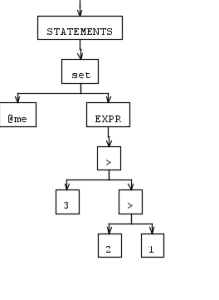
    As stated before following two expression produce two different AST, ignore the semantics of the operators as they are only to show proper AST construction.

    3 > 2 > 1
    3 > (2 > 1)
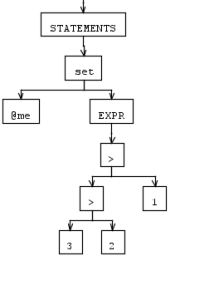


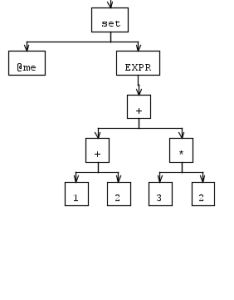
    Here is a expression parsed left to right

    set @me = 1+2+3*2
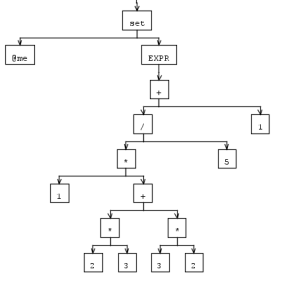
    Here is a more complex expression that shows precedence and parenthesis operations

    set @me = 1*(2*3 + 3*2)/5+1
    I think that for next post I will show on how to evaluate given expressions, also I am always looking for suggestions and comments

  • TransactionRequiredException: Executing an update/delete query

    Simply adding @Transactional on the method will resolve this issue

  • Convert given excel column name to column Index, ex ‘A=0’, ‘AA=26’

    Other day I needed to convert excel spreadsheet column name to column index when having 200+ columns is easier to express as ‘FB’ instead of 157

    A = 0 
    B = 1
    AA = 26
    AA = 27
    FB = 157
    

    This code will work for any number of column names.

    	/**
    	 * Convert given excel column name to column Index, ex 'A=0', 'AA=26'
    	 * @param columnName
    	 * @return 0 based index of the column
    	 */
    	private static short convert2ColumnIndex(String columnName) {
    		columnName = columnName.toUpperCase();
    		short value = 0;
    		for (int i = 0, k = columnName.length() - 1; i < columnName.length(); i++, k--) {
    			int alpabetIndex = ((short) columnName.charAt(i)) - 64;
    			int delta = 0;
    			// last column simply add it
    			if (k == 0) {
    				delta = alpabetIndex - 1;
    			} else { // aggregate
    				if (alpabetIndex == 0)
    					delta = (26 * k);
    				else
    					delta = (alpabetIndex * 26 * k);					
    			}
    			value += delta;
    		}
    		return value;
    	}
    

    Converting from index to column name

    This process is trivial we simply keep on taking mod 26 from index till we have nothing left, and converting that value to char.

  • StringOutputStream backed by ByteArrayOutputStream

    The other day I needed to read output stream directly into a string, but JDK does not provides us with a stream directly for that. There have been numerous discussions on why and why not we should have this build into the JDK, but this was a case where I did need it and knew the encoding.

    My implementation

    StringOutputStream backed by ByteArrayOutputStream that simplifies reading of OutputStream directly into string.

    
    import java.io.ByteArrayOutputStream;
    import java.io.IOException;
    import java.io.OutputStream;
    import java.nio.charset.Charset;
    
    /**
     * StringOutputStream backed by ByteArrayOutputStream that simplifies  reading of {@link OutputStream}  directly into string
     * @author Grzegorz Bugaj
     *
     */
    public class StringOutputStream extends OutputStream{
    	private ByteArrayOutputStream buffer = new ByteArrayOutputStream();
    	private static final Charset DEFAULT_CHARACTER_SET = Charset.forName("UTF-8");
    	private Charset characterSet;
    	
    	@Override
    	public void write(int b) throws IOException {
    		buffer.write(b);
    	}
    	
    	@Override
    	public void write(byte[] b) throws IOException {
    		buffer.write(b);
    	}
    
    	@Override
    	public void write(byte[] b, int off, int len) throws IOException {
    		buffer.write(b, off, len);
    	}
    	
    	/**
    	 * Get currently set character set if none set default charset of UTF-8 will be used
    	 * @return Charaset 
    	 */
    	public Charset getCharacterSet() {
    		if(characterSet == null)
    			return DEFAULT_CHARACTER_SET;
    		
    		return characterSet;
    	}
    
    	public void setCharacterSet(Charset characterSet) {
    		this.characterSet = characterSet;
    	}
    	
    	
    	@Override
    	public String toString() {
    		return new String(buffer.toByteArray(), getCharacterSet());
    	}
    }
    

    Usage Example

    	/**
    	 * Read in given stream into a string
    	 * @param stream
    	 * @return
    	 */
    	public static String readAsString(InputStream stream) throws IOException{
    		OutputStream sos = new StringOutputStream(); 		
    		// Set chunk size to 64K chunk
    		byte[] buffer = new byte[0x10000];
    		int readLen;
    		while((readLen = stream.read(buffer, 0, buffer.length)) != -1){
    			sos.write(buffer, 0, readLen);
    		}
    		return sos.toString();
    	}
    
  • Detecting Wide Area Network(WAN) IP programmatically

    Detecting Wide Area Network(WAN) IP programmatically

    This is a reliable way to detect WAN IP address from Java, cpp or any other programming language. Motivation for this was my need to update my DNS server automatically, presented code will be in Java I have decided to use Java for cross-platform support and its my favorite language, in near feature I will include cpp code as well(moding Linksys router to Support xname.org Free DNS service)

    Intro

    There are couple ways of detecting an WAN IP address that I know of, first one is to use ping utility with hop count of 1 then parse the results

    Z:\>ping -r 1 www.google.com

    Pinging www.l.google.com [64.233.167.147] with 32 bytes of data:

    Request timed out.

    drawback of this approach is that it is dependent on ping utility and is not cross platform compatible. The second strategy is to use some external service that will

    echo back us our ip address like http://www.whatismyip.com/ problem with this approach is that if service is down we want be able to retrieve our IP.

    Strategy

    I decided to go with second option using external service, to overcome the possibility of service being down I have assembled list of number of free Ip detection services using Goggle. Next step was to parse the page and extract the IP address, here came up another problem, some of the services contained multiple IP’s. My solution was to query my services while the number of top IP count was less than a set threshold.

    Code

    I am using regular expressions to extract all the IP from retrieved page.

    Regex Here

  • Fixing JasperReports net.sf.jasperreports.engine.JRRuntimeException: Error creating SAX parser

    While upgrading machines I have upgraded to run jdk 1.6 which have screwed up compiling of my reports with following error.

    C:\Program Files (x86)\Java\jdk1.6.0_24\jre\lib\endorsed
    Source File:c:/Users/greg/report2.jrxml
    Exception in thread "main" net.sf.jasperreports.engine.JRRuntimeException: Error creating SAX parser
    	at net.sf.jasperreports.engine.xml.JRReportSaxParserFactory.createParser(JRReportSaxParserFactory.java:109)
    	at net.sf.jasperreports.engine.xml.JRXmlDigesterFactory.createParser(JRXmlDigesterFactory.java:1320)
    	at net.sf.jasperreports.engine.xml.JRXmlDigesterFactory.createDigester(JRXmlDigesterFactory.java:1295)
    	at net.sf.jasperreports.engine.xml.JRXmlLoader.load(JRXmlLoader.java:199)
    	at net.sf.jasperreports.engine.xml.JRXmlLoader.load(JRXmlLoader.java:164)
    	at net.sf.jasperreports.engine.xml.JRXmlLoader.load(JRXmlLoader.java:148)
    	at net.sf.jasperreports.engine.JasperCompileManager.compileReportToFile(JasperCompileManager.java:85)
    	at com.americanbanksystems.complianceproreports.util.CompileReport.compileReport(CompileReport.java:133)
    	at com.americanbanksystems.complianceproreports.util.CompileReport.main(CompileReport.java:189)
    Caused by: org.xml.sax.SAXNotRecognizedException: http://java.sun.com/xml/jaxp/properties/schemaLanguage
    	at gnu.xml.aelfred2.XmlReader.getProperty(XmlReader.java:181)
    	at gnu.xml.aelfred2.XmlReader.setProperty(XmlReader.java:166)
    	at gnu.xml.aelfred2.JAXPFactory$JaxpParser.setProperty(JAXPFactory.java:147)
    	at net.sf.jasperreports.engine.xml.JRReportSaxParserFactory.configureParser(JRReportSaxParserFactory.java:140)
    	at net.sf.jasperreports.engine.xml.JRReportSaxParserFactory.createParser(JRReportSaxParserFactory.java:104)
    	... 8 more
    

    My first thought was to place the xalan.jar inside the ‘java.endorsed.dirs’ but that did not fix the problem.

     System.out.println(System.getProperty("java.endorsed.dirs"));

    So after a little investigation I have found the problem and simple solution, download following file or extract it from jasper reports libs folder

    xercesImpl-2.7.0.jar
    

    And place it inside your “java.endorsed.dirs” thats all.

  • Set memory for Sonatype Nexus

    While starting Nexus I was getting following error, this was on a machine that was running at 1GB of memory.

    Error occurred during initialization of VM
    Could not reserve enough space for object heap

    So the solution was to edit /usr/local/nexus/bin/jws/wrapper.conf
    and add wrapper.java.additional.4=-Xmx128m parameter this setup java to use only 128mb of memory for the new VM.

    Solution 2

    After further analysis of the config file there are following options that can be set as well, just need to uncomment them

    # Size Java memory, in MB (-Xms)
    #wrapper.java.initmemory=128
    # Size Java memory, in MB (-Xmx)
    #wrapper.java.maxmemory=256

  • Implementing GroupBy using Google guava Multimap and Function

    This is one way of creating a group by like functionality for collections using google guava Multimap and Function.

    Code is straight forward we simply use the index method of the Multimap to group our data by, in here we use our 2 column to group it by the department.

    Sample output

    key = Dev
      1 : Greg
      3 : Roman
    key = Support
      2 : Leo
      4 : Jobby
    

    Code

    package com.gregbugaj.guava;
    
    import java.util.Collection;
    import java.util.Iterator;
    import java.util.List;
    
    import com.google.common.base.Function;
    import com.google.common.collect.Lists;
    import com.google.common.collect.Multimap;
    import com.google.common.collect.Multimaps;
    
    public class GroupByMultimap {
    	public static void main(String[] args) {
    		Object[] o1 = new Object[] { 1, "Greg", "Dev" };
    		Object[] o2 = new Object[] { 2, "Leo", "Support" };
    		Object[] o3 = new Object[] { 3, "Roman", "Dev" };
    		Object[] o4 = new Object[] { 4, "Jobby", "Support" };
    
    		List rows = Lists.newArrayList(o1, o2, o3, o4);
    		Multimap grouped = Multimaps.index(rows,
    				new Function() {
    					@Override
    					public String apply(Object[] item) {
    						return (String) item[2];
    					}
    				});
    
    		Iterator keyIterator = grouped.asMap().keySet().iterator();
    		while (keyIterator.hasNext()) {
    			String key = keyIterator.next();
    			System.out.println("key = " + key);
    			Collection dataRows = grouped.get(key);
    			for (Object[] o : dataRows) {
    				System.out.println(String.format("  %d : %s", o[0], o[1]));
    			}
    		}
    	}
    }
    
    
  • Invoking Webservice Methods from Java

    This is my helper method for invoking webservices from java. One bonus perk is that this handles the exception when we are using self signed certificates by providing our own HostnameVerifier. This could be more generalized but all I needed was to invoke this one server.

    	/**
    	 * Invoke webservice to retrive data
    	 * 
    	 * @param 
    	 *            Return type the service will return
    	 * @param T
    	 * @param methodName
    	 *            name of method to execute
    	 * @param methodArgument
    	 *            need to match the methods in the webservice
    	 * @return
    	 */
    	public  T invokeWebserviceService(Class T, String methodName,
    			Object... methodArgument) {
    		T result = null;
    		try {
    			HttpServletRequest req = getRequest();
    			String host = req.getServerName();
    			String schema = "http";
    			if ("https".equals(req.getScheme())) {
    				schema = "https";
    				// Need to overide HostnameVerifier otherwise it throws a
    				// exception when we are using selfsigned certificates
    				HostnameVerifier hv = new HostnameVerifier() {
    					public boolean verify(String urlHostName, SSLSession session) {
    						return true;
    					}
    				};
    				HttpsURLConnection.setDefaultHostnameVerifier(hv);
    			}
    
    			String wsdlURL = schema + "://" + host
    					+ "/webservices/RiskBean"
    					+ schema.toUpperCase() + "?wsdl";
    			URL url = new URL(wsdlURL);
    
    			String ns = "http://reporting.ws.com/";
    			QName qname = new QName(ns, "RiskService"
    					+ schema.toUpperCase());
    			QName port = new QName(ns, "RiskBean"
    					+ schema.toUpperCase() + "Port");
    			QName operation = new QName(ns, methodName);
    
    			ServiceFactory riskServiceFactory = ServiceFactory.newInstance();
    			Service riskService = riskServiceFactory.createService(url, qname);
    
    			Call call = riskService.createCall(port, operation);
    			result = (T) call.invoke(methodArgument);
    		} catch (Exception e) {
    			e.printStackTrace();
    		}
    		return result;
    	}
    

    Hopefully someone finds this helpful.

  • Detaching managed entity from entitymanager.

    This code will detach a entity from hibernate Entitymanger making it thus unmanaged entity.

    // Prepare workbook object to be used for cloning.
     Session session = (Session) entityManager.getDelegate();
     session.evict(workbook); // same as detached
     workbook.setId(null);