BigCommerce Mod : Show brand logo image on Product Page

Written by

in

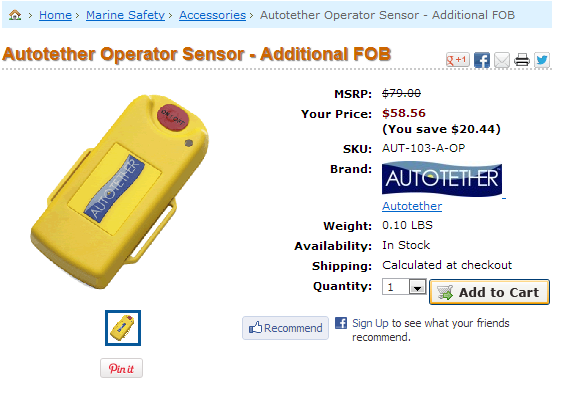
Showing brand logos on product pages in BigCommerce sites is harder than it should be. Here is a quick mod that will let us do that without need of using the API.
Here is the desired result
Code

This works by parsing you /brands page and then comparing current brand name to the one from parsed page.

Lets edit Panels/ProductPanels.html and change the current brand code into this

%%LNG_Brand%%:

%%GLOBAL_BrandName%%

Comments

14 responses to “BigCommerce Mod : Show brand logo image on Product Page”

  1. Luke Avatar
    Luke

    I’m just getting /templates/__custom/images/BrandDefault.gif this image displayed… is there a placeholder for the actual image?

  2. Renu Avatar
    Renu

    How do i add Description only on Brand page blow the brand.

    I have tired please give suggestion.

    1. Greg Avatar

      Can you give me a link to take a look of what you trying to do?

  3. Scott Avatar
    Scott

    Does this method still work with the new design?

    1. Greg Avatar

      This have worked at least couple months ago.

  4. Renu Avatar

    Hii ,
    Here is a link where i want to add brand description in li but text is different in every brand.

    Thanks

  5. Renu Avatar

    Hii ,
    http://www.a2zsecuritycameras.com/brands/
    Here is a link where i want to add brand description in li but text is different in every brand.

    Thanks

  6. Toby Zuijdveld Avatar

    I’d just like to say thanks for this code – I figured out I needed to enter it in Panels.ProductDetails.html (we must be using an older template?) and it works great. Also managed to make a variant of this work, displaying the image on the brand page (brands/brandnamehere.html) itself; thought I’d share. Open Panels/BrandContent.html and replace the heading line with this:

    %%GLOBAL_TrailBrandName%%

    $(document).ready(function() {

    $.ajax({
    url: "/brands"

    }).done(function ( data ) {
    var html = $(data);
    var items = $('.SubBrandListGrid li', html);

    items.each(function() {
    var link = $('a', this);
    if(link){
    var txt = $(link).text();
    if('%%GLOBAL_TrailBrandName%%' == txt){
    var img = $('img', this).attr('src');
    $('#brand-logo').attr('src', img);
    }
    }
    });
    });
    });

  7. Toby Zuijdveld Avatar

    Since my comments are awaiting moderation, perhaps you can just delete the above ones and use this:

    I’d just like to say thanks for this code – I figured out I needed to enter it in Panels.ProductDetails.html (we must be using an older template?) and it works great. Also managed to make a variant of this work, displaying the image on the brand page (brands/brandnamehere.html) itself; thought I’d share. Open Panels/BrandContent.html and replace the heading line with this:

    <h1><img src="/templates/__custom/images/BrandDefault.gif" border="0" id="brand-logo">  %%GLOBAL_TrailBrandName%%                         <script type="text/javascript">                                              $(document).ready(function() {                         $.ajax({                          url: "/brands"                          }).done(function ( data ) {                            var html = $(data);                            var items = $('.SubBrandListGrid li', html);                             items.each(function() {                                var link = $('a', this);                                if(link){                                var txt = $(link).text();                                                                    if('%%GLOBAL_TrailBrandName%%' == txt){                                        var img = $('img', this).attr('src');                                        $('#brand-logo').attr('src', img);                                    }                                        }                                                            });                                                     });                                             });                        </script></h1>

  8. scott Avatar

    Works a treat in Panels.ProductDetails.html

    Thanks Toby!

    Is there a way to reduce the size of the brand image – they look a little large on my product pages.

  9. beenson Avatar

    Help me the code is not working in our website http://www.richprime.net/

    1. Greg Avatar

      Let me know what the problem is ?

  10. raj Avatar

    Hi

    I have used your script , its working but its showing only one brand without image ,
    i need to show each products with there brands logo .

    so please suggest me what i did wrong .

    Thanks

    1. Greg Avatar

      I have not been working with BigCommerce a while, so I am not really sure how to do that right now.

Leave a Reply

Your email address will not be published. Required fields are marked *